
Fart Together Guide: Raft Controls and First Run
Use this Fart Together guide to learn Roblox raft controls, boarding, teamwork, obstacles, and checkpoints, with clear notes on what remains unverified.
On this page
- Start with the correct Roblox experience
- Board a raft and begin the run
- Learn direction and propulsion separately
- Coordinate with the other players
- Approach obstacles without inventing a route
- Understand what checkpoints do and do not establish
- Keep server size and raft size distinct
- Choose the next guide for your actual question
- Sources and verification limits
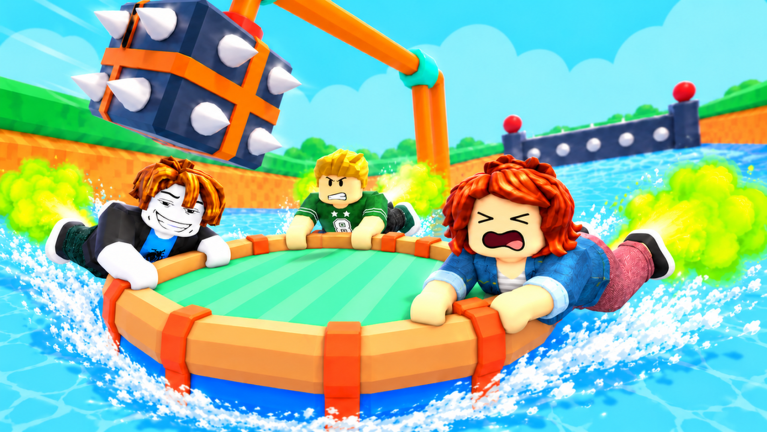
Start with the correct Roblox experience
Open the Fart Together experience published by fart with friends before following any controls or installation advice. Its official description identifies an obstacle course where propulsion, steering, and timing matter. A similarly named Steam game has a different developer, so its purchases, release plans, and computer requirements do not establish facts about this Roblox experience.
The official Roblox listing is the starting point for identifying the game, while the corresponding Medal experience page provides more detailed control instructions. This guide separates those two kinds of evidence so you know which instructions come from a secondary listing. Neither a written control description nor a screenshot establishes that every device combination has been tested successfully.
Board a raft and begin the run
The researched experience description says to step onto a boarding pad to join a raft. It assigns the START action to the raft leader and describes EXIT as the way to leave the raft. These are separate stages: entering the Roblox experience, boarding the raft, and starting the course are not the same action.
For a first attempt, use that sequence to understand where your group is in the process rather than guessing that everyone has started automatically. Confirm that your friends have boarded before the leader starts the run. This is a practical reading of the documented boarding flow, not a claim that the game has a particular countdown, ready check, or minimum team size.
Learn direction and propulsion separately
For PC, the researched bindings are A, Q, or Left Arrow for left steering, D or Right Arrow for right steering, and Space for propulsion. Mobile uses on-screen direction arrows and a fart button. The description does not provide a measured boost duration, a numerical fuel cost, or a guaranteed steering angle for any input.
Treat the directional input and the propulsion action as two parts of the same movement decision. Before approaching a difficult section, identify which way you intend to go and which control produces that action on your device. That approach follows the listed control functions without inventing an optimal button combination or promising that a certain number of presses clears a hazard.
Coordinate with the other players
The game description presents the course as something to tackle with friends, and the researched raft instructions emphasize working together to stay on course. Shared movement makes conflicting intentions a useful thing to check when the raft goes somewhere unexpected. Agreeing on an intended direction is a practice suggestion based on those described mechanics, not a hidden bonus or a documented damage reduction rule.
Use plain descriptions of the next action when discussing a run with your group, such as the direction you want to take before another boost. If the group disagrees about the route, resolve that before assuming the controls themselves are broken. No source reviewed for this guide establishes a required leader strategy, mandatory voice chat, or a fixed role for each player on the raft.
Approach obstacles without inventing a route
The official description says that timed propulsion helps players steer, boost, and move past obstacles. The supplied research also describes lining up the raft before reaching a difficult section. Those points support attention to direction and timing, but they do not provide a complete map, a numbered hazard list, or a fastest route through every stage.
Use the visible course in your current session to decide what needs correcting, rather than following an unsupported sequence from another game. If a guide names an obstacle, compare the claim with the actual Roblox experience and its creator before relying on it. This guide does not add checkpoint counts, obstacle names, speed values, or shortcut coordinates that have not been verified.
Understand what checkpoints do and do not establish
The researched description explicitly tells players to reach checkpoints while progressing toward the finish. That confirms checkpoints belong in an introduction to the course. It does not tell us whether progress persists between sessions, how a reset affects the entire group, or whether every participant must touch the same location.
Checkpoint recovery behavior is therefore marked Pending confirmation (待确认) rather than presented as a promise. Before relying on a reset to preserve progress, read the instructions visible in your current session. A checkpoint sign or a mention in a description cannot establish the exact consequences of leaving a raft, disconnecting, or restarting the experience.
Keep server size and raft size distinct
The official Roblox game API identifies this experience using place 123931542300224 and universe 10770800769. Its checked response lists a maximum server size of 18. That number describes the server field in the public data and must not be substituted for the number of people who can occupy one raft.
The same identity check is useful when comparing videos, social links, or statistics from different websites. A matching title alone is weaker evidence than the creator and the official experience address. Exact raft capacity, private-server options for a planned session, and a guaranteed way to reserve a raft for your group require their own confirmation.
Choose the next guide for your actual question
If you understand boarding but need button mappings, use the controls guide rather than repeating the entire setup process. If you can move but lose direction around hazards, continue with the obstacles guide. These pages separate input questions from course questions so that an installation issue is not mistaken for a movement technique.
For joining a friend before boarding, use the online guide and check Roblox's joining permissions. No verified redemption code or confirmed code-entry interface was found in the supplied research. Joining the developer's Roblox group is described as a hippo-color perk, but that should not be rewritten as a code, a paid upgrade, or a performance advantage.
Sources and verification limits
This page combines the supplied homepage research with the official Roblox experience, the official game API, and the corresponding Medal listing. Sources were checked on October 25, 2026, and written descriptions were not treated as a substitute for hands-on testing. Undocumented mechanics remain pending confirmation, and the practical suggestions above are not claimed to be a measured speedrun route.
Related pages
Fart Together — Controls Guide
Learn the researched inputs for PC, mobile, PlayStation, and Xbox.
Fart Together Game Download: Official Roblox Setup
Use the Fart Together game download guide to find the official Roblox experience, choose the right platform app, and avoid confusing it with another game.
Fart Together iOS: iPhone Setup and Touch Controls
Check Fart Together iOS access through Roblox, reported touch controls, iPhone and iPad requirements, and the difference between support and a play test.